
Chapter 7 of 12 · Premium
Cheque books
Tell the app about your cheque books once. It then fills in the next leaf number on every cheque, warns you when a book runs low, and keeps a register of every leaf.
Add a cheque book
- In Accounts, press Cheque books… (or Add cheque book) on the account.
- Type the letters printed before the number (for example CA) and the number of the first leaf (for example 1234501), and choose how many leaves the book has.
- Press Add cheque book.
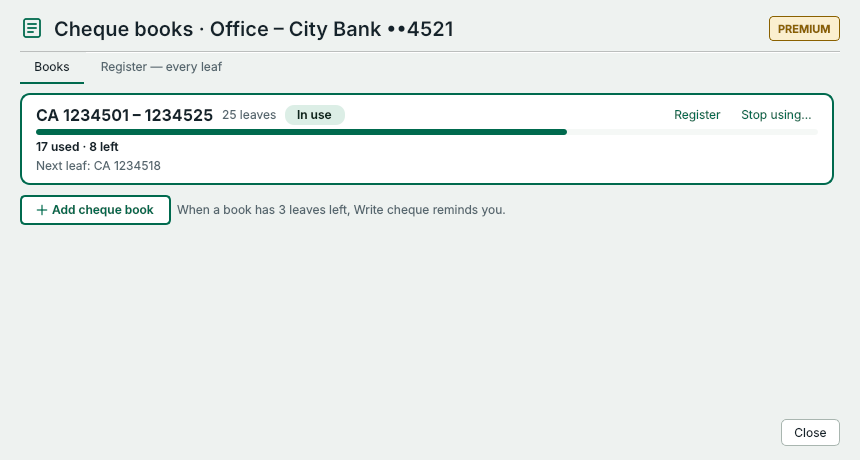
- Each book: its leaf numbers, how many are used and left, and the next leaf.
- Add a new cheque book: the first leaf number and how many leaves.
- Every leaf of the books and what happened to it.
When a book has 3 leaves left, Write cheque reminds you. When a book is finished or lost, press Stop using….
The register
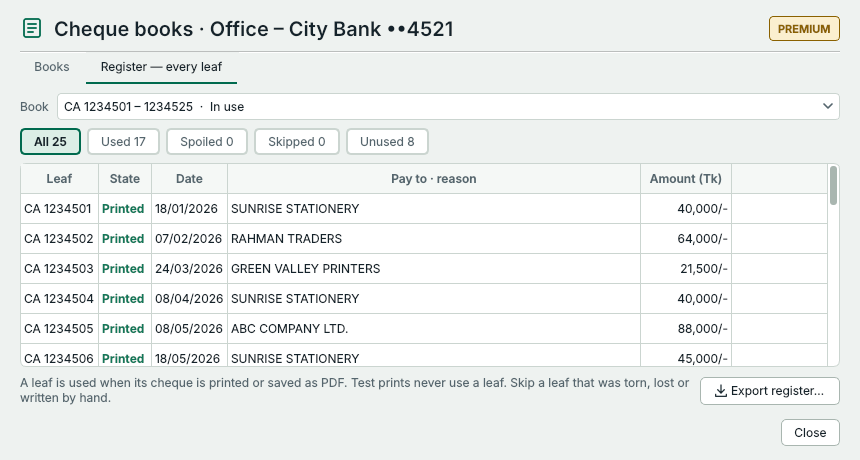
- Register lists every leaf: printed, spoiled, skipped or unused.
- Double-click a leaf to open its cheque.
- Save the register to Excel.
A leaf counts as used when its cheque is printed or saved as PDF; tests never use a leaf. If a leaf was torn, lost or written by hand, select it and press Skip this leaf… with the reason, so the next cheque uses the following leaf.
Something not clear? Questions and answers · Write to us. The pictures use made-up sample data.