Chapter 5 of 12 · Free and Premium
Cleared, bounced and stopped
A printed cheque is Outstanding until the bank pays it. When your statement shows what happened, note it in the app. Every plan has this.
What each status means
- Outstanding
- Printed, and the bank hasn't paid it yet. After 6 months it is shown as out of date.
- Cleared
- The bank paid it.
- Bounced
- The bank returned it unpaid. You can present it again later or replace it.
- Payment stopped
- You asked the bank not to pay it.
- Cancelled
- You no longer want it, for example it was never handed over.
Set the bank status
- In Cheques › Printed, select one or more cheques (or open one cheque's details).
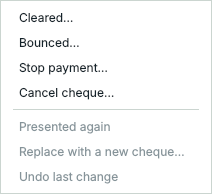
- Press Bank status ▾ and choose what happened.
The app asks for the date, and for a bounced, stopped or cancelled cheque, the reason:
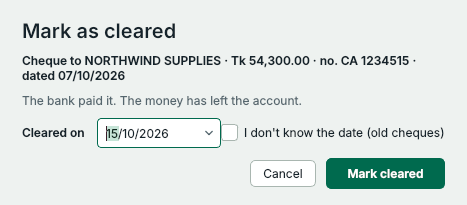
- The day the bank paid it, from your statement.
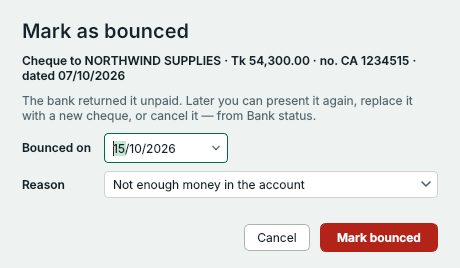
- The day the bank returned it.
- The bank's reason. It appears in the cheque's history and in reports.
Replace a bounced or stopped cheque
Choose Replace with a new cheque…. Write cheque opens with the same details, dated today – check every value before printing. When it prints, the two cheques are linked in their histories. If the bank presents a bounced cheque again, choose Presented again.
Made a mistake?
Undo last change takes back the last status you set on the selected cheques.
Something not clear? Questions and answers · Write to us. The pictures use made-up sample data.