Chapter 11 of 12 · Free, some parts Premium
Backups and a new PC
Your cheques live only on your PC, so keep a copy somewhere else.
Safety copies (every plan)
Once a day the app saves a safety copy of everything on this PC and keeps the last 7. They help if the data on this PC is ever damaged, but they only open on this PC. See them in Settings › Your data.
Back up Premium
Use File › Back up… or Settings › Your data › Back up now….
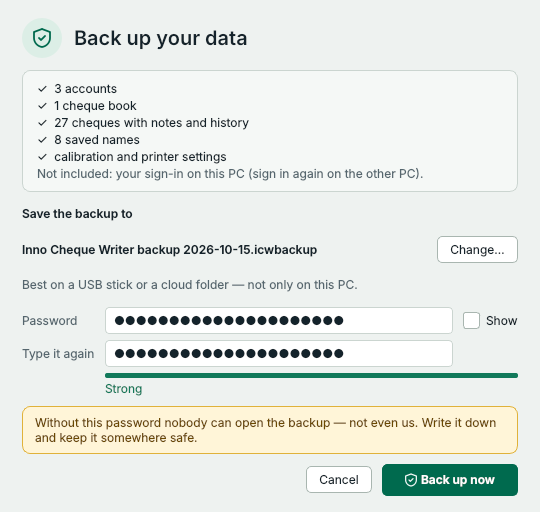
- Where the backup goes (Change…). Best on a USB stick or a cloud folder.
- A password you will remember, typed twice. Nobody can open the backup without it – not even us.
- Press Back up now.
The backup holds your accounts, cheque books, cheques with notes and history, saved names, and your calibration and printer settings, in one file protected by your password. Your sign-in is not included. The app reminds you when the last backup is a month old.
Move to a new PC
- On the old PC, make a backup and copy the file to a USB stick or a cloud folder.
- On the new PC, install the app, then choose File › Restore from a backup….
- Choose the file, type its password and press Open backup. Check what it contains, then press Replace everything. The app restarts.
- Sign in. On the old PC, sign out with Also remove this PC from my account, or remove it on My account › PCs.
Nobody can open a backup without its password – not even us. Write it down and keep it somewhere safe.
Something not clear? Questions and answers · Write to us. The pictures use made-up sample data.